A verse on your home screen
VerseDawn puts one verse from the Bible on your Android home screen. Read it in a quiet feed, study the words behind it, or listen to the whole chapter. Offline, no account.
Get it on Google PlayFree to download. The widget needs a subscription; reading, search, study, listening and prayer stay free.
Four sizes, sixteen backgrounds
The verse sits on your home screen in the size you choose: 2×2, 3×2, 4×2 or 4×4. Two layouts — words on a solid panel, or full-bleed with the artwork behind them. Sixteen backgrounds, from engravings to night. Tap the widget to open the verse.
- 2×2The short verse, no reference.
- 3×2One line and the reference.
- 4×2The full verse with room to breathe.
- 4×4The verse and its artwork, large.
The words behind the verse
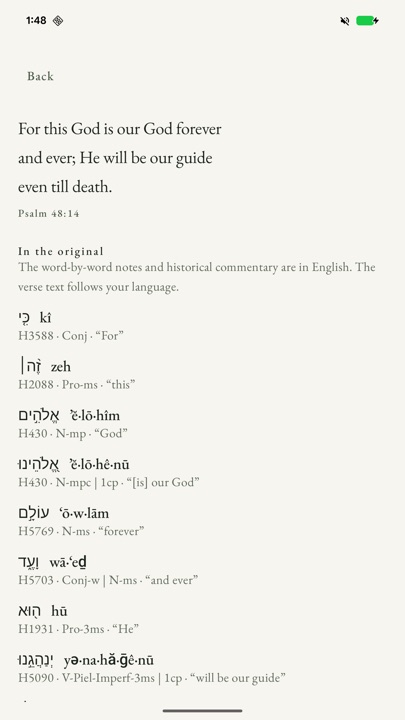
Every word carries its original form, transliteration, Strong's number and parsing. Historical notes come from public-domain commentaries, and when a note covers a range of verses we say which range. The question at the end is ours, not the text's, and we say so.
Listen with the screen off
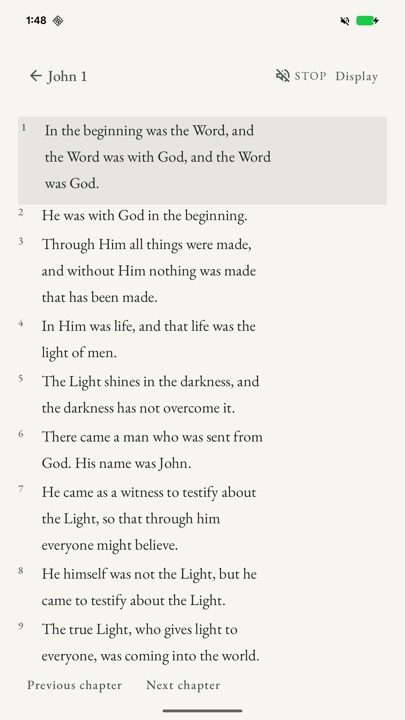
The verse, or the whole chapter, read aloud by your phone's own voice. The line being read stays highlighted, and playback keeps going with the screen locked. Speed and voice are yours to choose.
Reading aloud is free. A curated voice, when it ships, is part of the subscription.
Search the whole Bible, offline
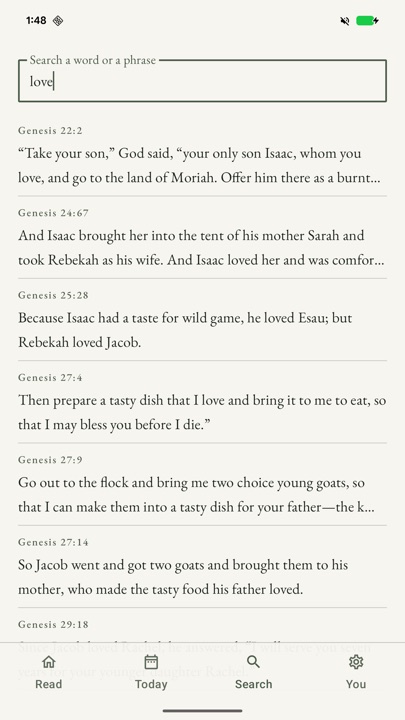
Type two letters and search the entire Berean Standard Bible. The text ships inside the app — no connection, no account, no server.
A two-minute prayer, when you want it
A short guided prayer in three steps, with music if you want it. No streaks, no nudges, and nothing asks whether you finished. You can leave at any step.
The prayer, the daily reminder, reading, search, study and listening are free.
What it costs
Free
No account. No trial clock.
Subscription
The home-screen widget, and no ads.
Prices are shown in US dollars and Brazilian reais. Google Play shows your local price, the trial if there is one, and the date of your first charge before you pay. The subscription renews until you cancel, in Google Play → Subscriptions.
Common questions
Do I need an account? No. There is no sign-in, no profile and no cloud sync. The Bible ships inside the app.
Does it work offline? Yes — reading, search, study and the daily reminder work with no connection. Listening uses the voices already on your phone.
What does it cost? The app is free to download. The widget needs a subscription: $6.99/month, $49.99/year or $2.99/week in the US; R$8,90, R$69,99 or R$2,99 in Brazil. Reading, search, study, listening and prayer are free.
Are there ads? The free version shows a small banner ad. Subscribing removes it.
Can I cancel? Yes — Google Play → Subscriptions. The subscription renews until you cancel.
Which phones? Android 8.0 and up.
What about my data? No account, and what you read stays on your phone. The app sends anonymous usage events; the ads SDK may use the advertising identifier. The details are in the privacy policy.
Which Bible, which languages? The Berean Standard Bible, offline, in English and Portuguese.
Read before you install
- The Bible widget market
What the leaders offer — and the gap a small app can fill.
- What widgets cost
Free, subscription, one-off: what you are actually paying for.
- Bible app prices
Published prices across the category, checked and dated.
- Bible apps without ads
Which ones really are ad-free, and how to tell before you install.
- Verse widgets and the lock screen
What “lock screen widget” means on Android — and what it does not.
- Verses as wallpaper
Wallpaper, widget or app: three different jobs.
- How to check a widget is legit
The listing, the permissions, the refunds.
- VerseDawn and YouVersion
Two different tools, compared plainly.
If you want one verse, quietly, on your home screen, it is on Google Play.
Get VerseDawn on Google PlaySee what it costs